
GPS Pipelines2.3.1 - Google Play
You'll be able to see results in few seconds.
Publisher Description

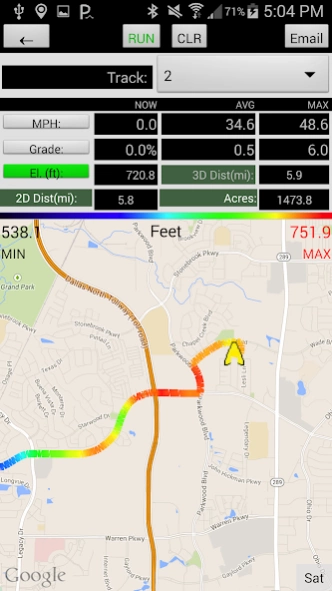
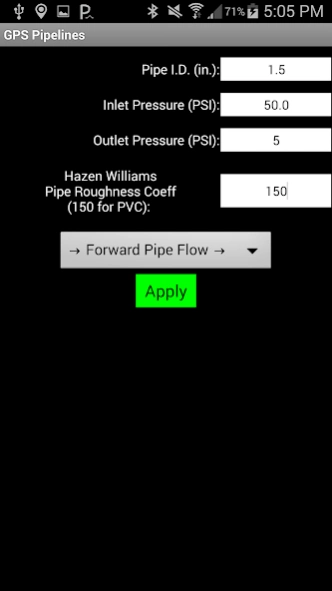

GPS pipeline analyzer with waypoints, tracks, area, graphs, and easy file share.
This program allows you to view and record GPS points, pipelines, tracks, distances, and areas while in the field. The device’s built in altimeter, when equipped, provides precise elevation data. Tracks can be viewed in Profile and Plan View with recent aerial imagery in the background. The tracks are displayed with color gradation based on the user’s preference of displaying speed, elevation, or grade. The data is easily saved and sent to email with the push of a button on email capable devices.
The water pipeline feature allows the user to assign a pipe diameter, Hazen-William’s Roughness Coefficient, flow direction, and inlet/outlet pressure to calculate a pipe’s maximum flow along tracks. The flow calculation is calculated continuously and assumes full pipe flow (Continuous acting air vents are typically installed at summits to release air and prevent debris from being pulled into pipeline leaks). The real time profile view, called water pipe chart, includes the hydraulic grade line so users can visualize the water pressure in the pipe and identify pipe summits that will reduce pipe flow.
The data is saved with the date, time, inputs, pipe flow, latitude, longitude, speed, elevation, % grade, 2D distance, 3D distance, hydraulic grade line, track description, track number, and waypoint information. Saved data can be reloaded into the program or imported into other programs.
For GIS (Geographic Information System) users, note that latitude and longitude information is WGS 84 (World Geodetic System 1984) when importing.
The data files can be saved as .csv (comma separated values), GPX, and TCX for easy import into GIS (Geographic Information System), GPS (Global Position System), and Civil Engineering applications.
Enjoy!
About GPS Pipelines
The company that develops GPS Pipelines is Innovative App Designs. The latest version released by its developer is 2.3.1.
To install GPS Pipelines on your Android device, just click the green Continue To App button above to start the installation process. The app is listed on our website since 2019-06-08 and was downloaded 0 times. We have already checked if the download link is safe, however for your own protection we recommend that you scan the downloaded app with your antivirus. Your antivirus may detect the GPS Pipelines as malware as malware if the download link to com.innovativeappdesigns.depthfinder is broken.
How to install GPS Pipelines on your Android device:
- Click on the Continue To App button on our website. This will redirect you to Google Play.
- Once the GPS Pipelines is shown in the Google Play listing of your Android device, you can start its download and installation. Tap on the Install button located below the search bar and to the right of the app icon.
- A pop-up window with the permissions required by GPS Pipelines will be shown. Click on Accept to continue the process.
- GPS Pipelines will be downloaded onto your device, displaying a progress. Once the download completes, the installation will start and you'll get a notification after the installation is finished.
Program Details
System requirements
Download information
Pricing
Version History
version 2.3.1
posted on 2019-06-08
App not working with latest Android 10 update on Samsung and we are looking onto a solution to this.
2.3.1 Added Manual Barometer Calibration Preference
version 2.3.1
posted on 2019-06-08
2.3.1 Added Manual Barometer Calibration Preference
version 2.2.0
posted on 2016-09-11
Ver 2.2.0 Allow setting waypoints off-track while paused with updated elevation data.,Ver 2.1.9 Bug fix for possible error during file save with no data connection.,Ver. 2.1.8 Re-cal barometer after CLR. Color elevation text red if baro disagrees with service elevation more than 20ft. Add periodic service elevation points after re-load to save to .csv.,Ver. 2.1.7 Bug fix to allow emailing after loading old data file.
Disclaimer
Official Google Play Link
We do not host GPS Pipelines on our servers. We did not scan it for viruses, adware, spyware or other type of malware. This app is hosted by Google and passed their terms and conditions to be listed there. We recommend caution when installing it.
The Google Play link for GPS Pipelines is provided to you by apps112.com without any warranties, representations or guarantees of any kind, so access it at your own risk.
If you have questions regarding this particular app contact the publisher directly. For questions about the functionalities of apps112.com contact us.
